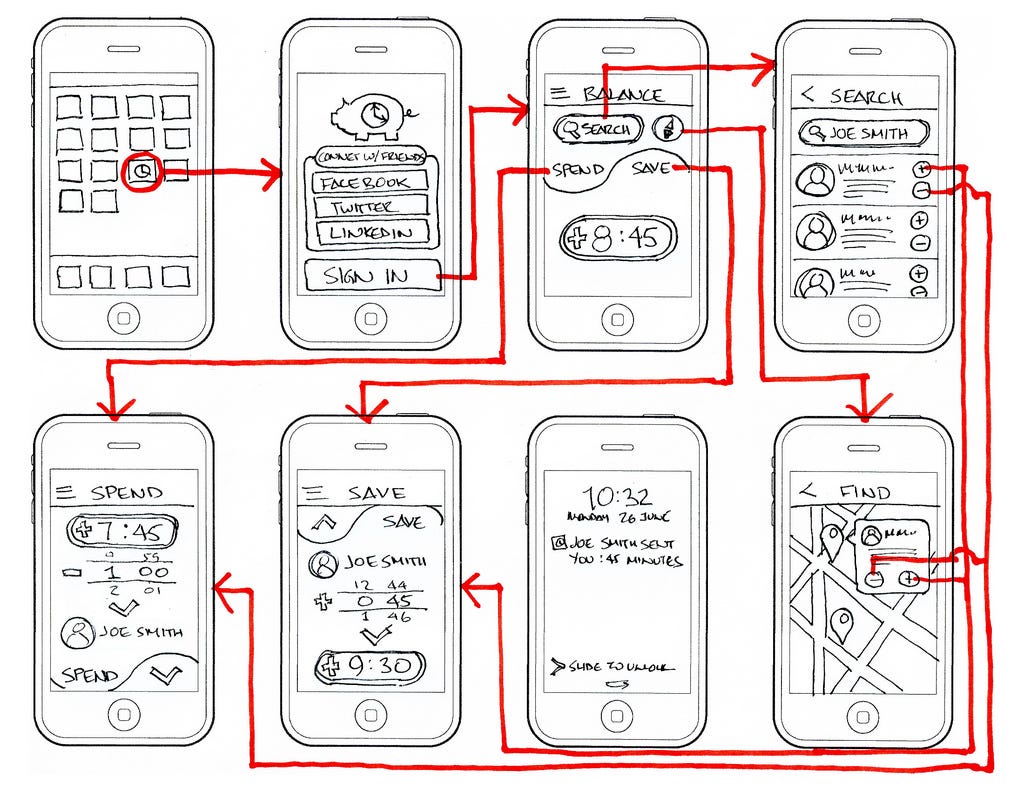
Introduction to Wireframing
Wireframing is a crucial step in the UI/UX design process that involves creating a low-fidelity visual representation of a product's layout, interface, and functionality. It is a way to visualize and communicate the basic structure and organization of a product, allowing designers to test and refine their ideas before moving on to high-fidelity designs.
Wireframes are typically created using simple shapes, lines, and text, and are often grayscale or monochrome. They can be hand-drawn or created using digital tools such as Sketch or Figma. The goal of wireframing is to focus on the product's functionality, usability, and user experience, rather than its visual design.
Benefits of Wireframing
Wireframing offers several benefits to the UI/UX design process. Some of the most significant advantages include:
- Improved Communication: Wireframes provide a common language for designers, developers, and stakeholders to communicate and discuss the product's design and functionality.
- Reduced Errors: By identifying and addressing design issues early on, wireframing can help reduce errors and misunderstandings that can occur during the development process.
- Increased Efficiency: Wireframing allows designers to test and refine their ideas quickly and efficiently, reducing the time and resources required to create a functional product.
- Enhanced User Experience: Wireframing enables designers to focus on creating a user-centered design that meets the needs and expectations of the target audience.
Tools for Wireframing
- There are many tools available for wireframing, ranging from simple and intuitive to complex and feature-rich. Some popular tools for wireframing include:
- Sketch: A digital design tool that offers a wide range of features and plugins for wireframing and prototyping.
- Figma: A cloud-based design tool that allows real-time collaboration and feedback.
- Adobe XD: A user experience design software that offers a range of features for wireframing, prototyping, and design systems.
- Balsamiq: A wireframing tool that offers a simple and intuitive interface for creating low-fidelity designs.
Best Practices for Wireframing
- To get the most out of wireframing, it's essential to follow best practices and guidelines. Some tips for effective wireframing include:
- Keep it Simple: Focus on the product's basic structure and functionality, rather than its visual design.
- Use Simple Shapes and Lines: Avoid using complex shapes or detailed graphics, and instead use simple shapes and lines to represent the product's interface.
- Test and Refine: Test your wireframes with users and stakeholders, and refine your design based on feedback and results.
- Collaborate with Others: Wireframing is a collaborative process, so be sure to involve designers, developers, and stakeholders in the design process.
Loved this post?
No upcoming cohort right now — but we're always launching new ones!
Check out our full program lineup.
Comments (0)
No comments yet. Be the first to leave a comment!
Leave a Comment
Categories
- A Day in the Life Series
- Behind the Scene
- Career Development
- Digital Marketing
- Faculty and Staff Spotlight
- Perspectives
- Product Design
- Program Overview
- Promotion Strategy
- Study Tips and Tricks
- Success Stories
- Sustainability and Social Responsibility
- Tips & Insights
- Trend in Education
- Web Development
Recent Posts
• Celebrating the Next Generation of Tech Talent in Osun • OsunDIB Program with Madros Lessons Week One Recap: Empowering Digital Leaders • Week 2 Recap: UI/UX and Fullstack Progress • Week 3 to Week 6 Recap at OsunDIB Program • Week 7 Recap at OsunDIB Program: Fullstack and UX/UX Students in Full Swing • Building the Future: Inside the 8-Week Success Story of the Osun Digital Innovation Bootcamp • Unlocking Data Insights with Power BIReady to Level Up?
Explore our practical, live, and certification tech courses today.
Explore Courses →